

2025 Instructions for Form 540 2EZ California Resident Income Tax Return
References in these instructions are to the Internal Revenue Code (IRC) as of January 1, 2025, and the California Revenue and Taxation Code (R&TC).
Things you need to know before you complete Form 540 2EZ
Determine if you qualify to use Form 540 2EZ, California Resident Income Tax Return. See “Qualifying to Use Form 540 2EZ.”
You cannot use Form 540 2EZ if:
- You file a joint tax return and either spouse/RDP was a nonresident in 2025. Use Form 540NR, California Nonresident or Part-Year Resident Income Tax Return. This form is available online at ftb.ca.gov/forms or file online using e-file.
- You are married/RDP and file a separate tax return. Get Form 540 online at ftb.ca.gov/forms or file online through CalFile or e-file.
- You have income from a source outside of California.
- You have income from a source not listed on this form.
- You made estimate payments or have an estimated tax payment transfer from 2024.
- You have real estate or other withholding from Form 592-B, Resident and Nonresident Withholding Tax Statement, or Form 593, Real Estate Withholding Statement.
Note: The lines on Form 540 2EZ are numbered with gaps in the line number sequence. For example, line 14 and line 15 do not appear on Form 540 2EZ, so the line number that follows line 13 on Form 540 2EZ is line 16.
Caution: Form 540 2EZ has five sides. When filing Form 540 2EZ, you must send all five sides to the Franchise Tax Board (FTB) and Side 5 must be signed.
If you need to amend your California resident income tax return, complete an amended Form 540 2EZ and check the box at the top of Form 540 2EZ indicating AMENDED return. Attach Schedule X, California Explanation of Amended Return Changes, to the amended Form 540 2EZ. For specific instructions, see “Instructions for Filing a 2025 Amended Return”.
Social security benefits and unemployment compensation may be taxable for federal tax purposes but are not taxable for California tax purposes, and are not reported on Form 540 2EZ.
Specific Line Instructions
Name(s) and Address
Print your first name, middle initial, last name, and street address in the spaces provided at the top of the form.
Suffix
Use the Suffix field for generational name suffixes such as “SR”, “JR”, “III”, “IV”. Do not enter academic, professional, or honorary suffixes.
Additional Information
Use the Additional Information field for “In-Care-Of” name and other supplemental address information only.
Foreign Address
If you have a foreign address, follow the country’s practice for entering the city, county, province, state, country, and postal code, as applicable, in the appropriate boxes. Do not abbreviate the country name.
Date of Birth (DOB)
Enter your DOB (mm/dd/yyyy) in the spaces provided. If your filing status is married/RDP filing jointly or married/RDP filing separately, enter the DOBs in the same order as the names.
Prior Name
If you or your spouse/RDP filed your 2024 tax return under a different last name, write the last name only from the 2024 tax return.
Social Security Number (SSN) or Individual Taxpayer Identification Number (ITIN)
Enter your SSN in the spaces provided. If you file a joint tax return, enter the SSNs in the same order as the names.
If you do not have an SSN because you are a nonresident or a resident alien for federal tax purposes, and the Internal Revenue Service (IRS) issued you an ITIN, enter the ITIN in the space provided for the SSN.
An ITIN is a tax processing number issued by the IRS to foreign nationals and others who have a federal tax filing requirement and do not qualify for an SSN. The ITIN is a nine-digit number that always starts with the number 9.
Principal Residence
If you are under 18 years old or have not filed a California resident income tax return in the prior year, then leave the county and principal/physical address fields blank.
Only complete this section if you are age 18 or older and you have filed a California resident income tax return in the prior year.
- County – Enter the county where you have your principal/physical residence on the date that you file your Form 540 2EZ. If you reside in a foreign country at the time of filing, leave the county field blank.
- If your principal/physical residence address at the time of filing is the same as the address you provided at the top of this form, check the box provided on this line.
- If your principal/physical residence address at the time of filing is different from the address at the top of this form, provide the address of your principal/physical residence in the spaces provided.
- If you reside in a foreign country at the time of filing, enter the city, province or state, and country in the city field. Follow the country's practice for entering the postal code. Do not abbreviate the country name.
Line 1 through Line 5 – Filing Status
Check the box on Form 540 2EZ for the filing status that applies to you.
If your California filing status is different from your federal filing status, check the box above the filing status.
Filing Status Checklist
Choose only one filing status. Your filing status for California must be the same as the filing status you used on your federal income tax return.
Exception:
Registered domestic partners (RDPs) who file single for federal must file married/RDP filing jointly or married/RDP filing separately for California. If you are an RDP and file head of household for federal, you may file head of household for California only if you meet the requirements to be considered unmarried or considered not in a registered domestic partnership.
Single
You are single if any of the following was true on December 31, 2025:
- You were not married or in an RDP.
- You received a final decree of divorce or legal separation, or your RDP was terminated.
- You were a surviving spouse before January 1, 2025, and did not remarry or enter into another RDP in 2025 (see Qualifying Surviving Spouse/RDP).
Married/RDP Filing Jointly
You may file married/RDP filing jointly if any of the following is true:
- You were married/RDP as of December 31, 2025, even if you did not live with your spouse/RDP at the end of 2025.
- Your spouse/RDP died in 2025 and you did not remarry or enter into another RDP in 2025.
- Your spouse/RDP died in 2026 before the 2025 tax return was filed.
A married couple or RDPs may file a joint return even if only one had income or if they did not live together all year. However, both must sign the tax return.
Head of Household
For the specific requirements that must be met to qualify for head of household filing status, get FTB Pub. 1540, California Head of Household Filing Status. In general, head of household filing status is for unmarried individuals and certain married individuals or RDPs living apart who provide a home for a specified relative. You may be entitled to use head of household filing status if all of the following apply:
- You were unmarried and not in an RDP, or you met the requirements to be considered unmarried or considered not in an RDP on December 31, 2025.
- You paid more than one-half the cost of keeping up your home for the year in 2025.
- For more than half the year, your home was the main home for you and one of the specified relatives who by law can qualify you for head of household filing status.
- The relative who lived with you met the requirements to be a qualifying child or qualifying relative.
- You were not a nonresident alien at any time during the year.
For a child to qualify as your foster child for head of household purposes, the child must be placed with you by an authorized placement agency or by order of a court.
California requires taxpayers who use head of household filing status to file form FTB 3532, Head of Household Filing Status Schedule, to report how the head of household filing status was determined. If you do not attach a completed form FTB 3532 to your tax return, we will deny your Head of Household filing status. For more information about the Head of Household filing requirements, go to ftb.ca.gov and search for hoh. To get form FTB 3532, see "Automated Phone Service" or go to ftb.ca.gov/forms.
Qualifying Surviving Spouse/RDP
You are a qualifying surviving spouse/RDP if all of the following apply:
- Your spouse/RDP died in 2023 or 2024, and you did not remarry or enter into another RDP in 2025.
- You have a child, stepchild, or adopted child (not a foster child) whom you can claim as a dependent or could claim as a dependent except that, for 2025:
- The child had gross income of $5,200 or more;
- The child filed a joint return, or
- You could be claimed as a dependent on someone else’s return.
- If the child isn’t claimed as your dependent, enter the child’s name in the entry space under the “Qualifying surviving spouse/RDP” filing status.
- This child lived in your home for all of 2025. Temporary absences, such as for school, vacation, or medical care, count as time lived in the home.
- You paid over half the cost of keeping up your home for this child.
- You could have filed a joint tax return with your spouse/RDP the year he or she died, even if you actually did not do so.
Enter the year of your spouse’s/RDP’s death on your tax return.
Line 6 – Can you be claimed as a dependent?
If someone else can claim you (or your spouse/RDP) as a dependent on their tax return, even if they choose not to, and your total income is less than or equal to the following amounts based on your filing status or you have a dependent, you cannot use Form 540 2EZ. Get Form 540 online at ftb.ca.gov/forms or file online through CalFile or e-file.
- Single: $18,956
- Married/RDP filing jointly or Qualifying surviving spouse/RDP: $37,862
- Head of Household: $26,762
Note: You cannot use Form 540 2EZ if your total wages are less than the following amounts based on your filing status:
- Single: $5,256
- Married/RDP filing jointly, head of household, or qualifying surviving spouse/RDP: $10,962
If you can be claimed as a dependent and can use Form 540 2EZ, check the box on line 6 and follow the instructions on line 17.
If you are married or in an RDP and file a joint return, you can be claimed as a dependent on someone else's return if you file the joint return only to claim a refund of withheld income tax or estimated tax paid.
Line 7 – Senior
If you (or if married/RDP, your spouse/RDP) are 65 years of age or older, enter 1; if both are 65 years of age or older, enter 2.
If your (or if married/RDP, your spouse’s/RDP’s) 65th birthday is on January 1, 2026, you are considered to be age 65 on December 31, 2025.
Line 8 – Dependents
You must enter the first name, last name, SSN or ITIN, and relationship of each of the dependents you are allowed to claim.
If you claim more than three dependents, get Form 540 online at ftb.ca.gov/forms or file online through CalFile or e-file.
For taxable years beginning on or after January 1, 2018, taxpayers claiming a dependent exemption credit for a dependent who is ineligible for an SSN and a federal ITIN may provide alternative information to the FTB to identify the dependent.
To claim the dependent exemption credit, taxpayers complete form FTB 3568, Alternative Identifying Information for the Dependent Exemption Credit, attach the form and required documentation to their tax return, and write “no id” in the SSN field of line 8, Dependents, on Form 540 2EZ. For each dependent being claimed that does not have an SSN and an ITIN, a form FTB 3568 must be provided along with supporting documentation. If you e-file, attach any requested forms, schedules, and documents according to your software's instructions.
Taxpayers may amend their tax returns beginning with taxable year 2018 to claim the dependent exemption credit. These taxpayers should complete an amended Form 540 2EZ, write “no id” in the SSN field on the Dependents line, and attach Schedule X. To complete Schedule X, check box m for “Other” on Part II, line 1, and write the explanation "Claim dependent exemption credit with no id and form FTB 3568 is attached" on Part II, line 2. Make sure to attach form FTB 3568 and the required supporting documents in addition to the amended tax return and Schedule X. If taxpayers do not claim the dependent exemption credit on their original 2025 tax return, they may amend their 2025 tax return following the same procedures used to amend their previous year amended tax returns beginning with taxable year 2018. If claiming a refund, taxpayers must amend their returns within the statute of limitations. For more information, get FTB Notice 2021-01.
If your dependent child was born and died in 2025 and you do not have an SSN or an ITIN for the child, write “Died” in the SSN field and include a copy of the child’s birth certificate, death certificate, or hospital records. The document must show the child was born alive. If you e-file, attach any requested forms, schedules, and documents according to your software's instructions.
Do you have Child and Dependent Care Expenses? If so, you may qualify for a credit. For more information, get form FTB 3506, Child and Dependent Care Expense Credit. The easiest way to claim the credit is to CalFile or e-file. This credit may not be claimed on Form 540 2EZ.
Line 9 – Total Wages
Enter the amount from federal Form W-2, Wage and Tax Statement, box 16. If you have more than one federal Form W-2, add all amounts shown in box 16.
Generally, federal Form W-2, box 1 and box 16 should contain the same amounts. If they are different because you had income from a source outside California, you cannot file Form 540 2EZ. Get Form 540 or Form 540NR at ftb.ca.gov/forms or file online through CalFile or e-file.
Line 10 – Total Interest Income
Enter interest income shown on federal Form 1099-INT, Interest Income, box 1.
Tip: Do not include amounts shown on federal Form 1099-INT, box 3, Interest on U.S. Savings Bonds and Treasury Obligations. This interest is not taxed by California.
Line 11 – Total Dividend Income
Generally, the amount of dividend income taxable by California is the same as the amount taxable under federal law. However, there may be federal/state differences in the taxable amount of dividend income, if you received it from any of the following sources:
- Exempt interest dividends from mutual funds.
- Non-cash patronage dividends from farmers’ cooperatives or mutual associations.
- Federal exempt interest dividends from other states or their municipal obligations and/or from mutual funds.
- Controlled foreign corporation dividends in the year distributed.
- Regulated investment company capital gains in the year distributed.
- Distributions of pre-1987 earnings from an S corporation.
If you have a federal/state difference in the taxable amount of dividend income, you cannot file Form 540 2EZ. Get Form 540 at ftb.ca.gov/forms or file online through CalFile or e-file.
Line 12 – Total Pension Income
Generally, the amount of pension income taxable by California is the same as the amount taxable under federal law. However, there may be federal/state differences in the taxable amount of pension income, if you received it from any of the following sources:
- Tier 2 railroad retirement benefits.
- Partially taxable distributions from a pension plan.
- Retirement annuity between July 1, 1986, and January 1, 1987, and elected to use the three-year rule for California purposes and annuity rules for federal purposes.
For information regarding California tax treatment of distributions from pension plans, annuities, or individual retirement arrangements, get FTB Pub. 1005, Pension and Annuity Guidelines. If you have a federal/state difference in the taxable amount of pension income, you cannot file Form 540 2EZ. Get Form 540 at ftb.ca.gov/forms or e-file.
Line 13 – Total Capital Gain Distributions from Mutual Funds
Generally, the amount of capital gains taxable by California is the same as the amount taxable under federal law. If you received capital gain distributions from a mutual fund, report them on line 13, if both of the following apply:
- You received federal Form 1099-DIV, Dividends and Distributions, with an amount in box 2a.
- The federal Form 1099-DIV does not have amounts in box 2b, 2c, or 2d.
If you have other capital gains, you cannot use Form 540 2EZ. Get Form 540 at ftb.ca.gov/forms or e-file.
Line 17 – Tax
The standard deduction and personal exemption credit are built into the 2EZ Tables and not reported on the tax return.
If you did not check the box on line 6, follow the instructions below.
Use the California 2EZ Table for your filing status to complete line 17. The 2EZ Tables in this booklet give you credit for the standard deduction for your filing status, your personal exemption credit, and dependent exemption credits. There are three different tables. Make sure you use the correct table. If your filing status is:
- Single: Go to the 2025 California 2EZ Single Tax Table.
- Married/RDP filing jointly or Qualifying surviving spouse/RDP: Go to the 2025 California 2EZ Married/RDP Filing Jointly or Qualifying Surviving Spouse/RDP Tax Table.
- Head of Household: Go to the 2025 California 2EZ Head of Household Tax Table.
If you checked the box on line 6, complete the Dependent Tax Worksheet.
Dependent Tax Worksheet
- Using the amount from Form 540 2EZ, line 16, and your filing status, enter the tax from the 2EZ Table:
If your filing status is:- Single, go to the 2025 California 2EZ Single Tax Table.
- Married/RDP filing jointly or Qualifying surviving spouse/RDP, go to the 2025 California 2EZ Married/RDP Filing Jointly or Qualifying Surviving Spouse/RDP Tax Table.
- Head of household, go to the 2025 California 2EZ Head of Household Tax Table.
-
- If single or head of household, enter $153.
- If married/RDP and both spouses/RDPs can be claimed as a dependent by another taxpayer, enter $306.
- If married/RDP and only one spouse/RDP can be claimed, enter $153.
- If qualifying surviving spouse/RDP, enter $306.
- Add line 1 and line 2. Enter here and include on Form 540 2EZ, line 17.
Line 18 – Senior Exemption
If you entered 1 in the box on line 7, enter $153. If you entered 2 in the box on line 7, enter $306.
You cannot claim this exemption credit if someone else can claim you as a dependent on their tax return.
Line 19 – Nonrefundable Renter’s Credit
If you were a resident of California and paid rent on property in California which was your principal residence, you may qualify for a credit that you can use to reduce your tax. Complete the “Nonrefundable Renter’s Credit Qualification Record” included in this booklet to see if you qualify.
Line 22 – Total Tax Withheld
Enter the amount from federal Form(s) W-2, box 17, or federal Form 1099-R, Distributions From Pensions, Annuities, Retirement or Profit-Sharing Plans, IRAs, Insurance Contracts, etc., box 14. If you have more than one federal Form W-2, add all amounts shown in box 17. If you have more than one federal Form 1099-R, add all amounts shown in box 14. The FTB verifies all withholding claimed from federal Forms W-2 or 1099-R with the Employment Development Department (EDD).
Line 23a – Earned Income Tax Credit (EITC)
Enter your Earned Income Tax Credit from form FTB 3514, California Earned Income Tax Credit, line 20.
Line 23b – Young Child Tax Credit (YCTC)
Enter your Young Child Tax Credit from form FTB 3514, line 28.
Line 23c – Foster Youth Tax Credit (FYTC)
Enter your Foster Youth Tax Credit from form FTB 3514, line 39.
Use Tax
Line 26 – Use Tax
You are required to enter a number on this line. If the amount due is zero, you must check the applicable box to indicate that you either owe no use tax, or you paid your use tax obligation directly to the California Department of Tax and Fee Administration.
You may owe use tax if you made purchases from out-of-state retailers (for example, purchases made by telephone, online, by mail, or in person) where California sales or use tax was not paid and you used those items in California.
If you have questions about whether a purchase is taxable, go to the California Department of Tax and Fee Administration’s website at cdtfa.ca.gov, or call its Customer Service Center at 800-400-7115 (TTY:711) (for hearing and speech disabilities).
Some taxpayers are required to report business purchases subject to use tax directly to the California Department of Tax and Fee Administration. However, they may report certain personal purchases subject to use tax on the FTB income tax return.
You may not report business purchases subject to use tax on your income tax return if you:
- Have or are required to hold a California seller’s permit.
- Make more than $10,000 in purchases subject to use tax (excluding vehicles, vessels, and aircraft) per calendar year and have not paid use tax on those purchases to a retailer engaged in business in California or to a retailer authorized by the California Department of Tax and Fee Administration to collect the tax.
- Are otherwise registered or required to be registered with the California Department of Tax and Fee Administration to report use tax.
Note: You may not report use tax on your income tax return for certain types of transactions. These types of transactions are described below in the instructions.
The Use Tax Worksheet and Estimated Use Tax Lookup Table will help you determine how much use tax to report. If you owe use tax but you do not report it on your income tax return, you must report and pay the tax to the California Department of Tax and Fee Administration. For information on how to report use tax directly to the California Department of Tax and Fee Administration, go to their website at cdtfa.ca.gov and type “Find Information About Use Tax” in the search bar.
Failure to report and pay timely may result in the assessment of interest, penalties, and fees.
See general explanation of California use tax.
Use Tax Worksheet
You must use the Use Tax Worksheet to calculate your use tax liability, if any of these apply:
- You prefer to calculate the amount of use tax due based upon your actual purchases subject to use tax, rather than based on an estimate.
- You owe use tax on any item purchased for use in a trade or business and you are not registered or required to be registered with the California Department of Tax and Fee Administration to report sales or use tax.
- You owe use tax on purchases of individual items with a purchase price of $1,000 or more each.
Example 1: You purchased a television for $2,000 from an out-of-state retailer that did not collect tax. You must use the Use Tax Worksheet to calculate the tax due on the price of the television, since the price of the television is $1,000 or more.
Example 2: You purchased a computer monitor for $300, a rare coin for $500, and designer clothing for $250 from out-of-state retailers that did not collect tax. Although the total price of all the items is $1,050, the price of each item is less than $1,000. Since none of these individual items are $1,000 or more, you are not required to use the Use Tax Worksheet and may choose to use the Estimated Use Tax Lookup Table.
If you have a combination of individual non-business items purchased for $1,000 or more each, and/or items purchased for use in a trade or business in addition to individual, non-business items purchased for less than $1,000, you may either:
- Use the Use Tax Worksheet to compute use tax due on all purchases, or
- Use the Use Tax Worksheet to compute use tax due on all individual items purchased for $1,000 or more plus all items purchased for use in a trade or business.
- Use the Estimated Use Tax Lookup Table to estimate the use tax due on individual, non-business items purchased for less than $1,000, then add the amounts and report the total use tax on Line 26.
Example 3: The total price of the items you purchased from out-of-state retailers that did not collect use tax is $2,300, which includes a $1,000 television, a $900 painting, and a $400 table for your living room.
- You may choose to calculate the use tax due on the total price of $2,300 using the Use Tax Worksheet, or
- You may choose to calculate the use tax due on the $1,000 price of the television using the Use Tax Worksheet and estimate your use tax liability for the painting and table by using the Estimated Use Tax Lookup Table, then add the amounts and report the total use tax on Line 26.
Use Tax Worksheet (See instructions below)
Use whole dollars only
- Enter purchases from out-of-state sellers made without payment of California sales/use tax. If you choose to estimate the use tax due on individual, non-business items purchased for less than $1,000 each, only enter purchases of items with a purchase price of $1,000 or more plus items purchased for use in a trade or business not registered with the California Department of Tax and Fee Administration.
- Enter the applicable sales and use tax rate.
- Multiply Line 1 by the tax rate on Line 2. Enter result here.
- If you choose to estimate the use tax due on individual, non-business items purchased for less than $1,000 each, enter the use tax amount due from the Estimated Use Tax Lookup Table. If all of your purchases are included in Line 1, enter -0-.
- Add Lines 3 and 4. This is your total use tax.
- Enter any sales or use tax you paid to another state for purchases included on Line 1. See worksheet instructions below.
- Subtract Line 6 from Line 5. This is the total use tax due. Enter the amount due on Line 26. If the amount is less than zero, enter -0-.
Worksheet, Line 1, Purchases Subject to Use Tax
Report purchases of items that would have been subject to sales tax if purchased from a California retailer unless your receipt shows that California tax was paid directly to the retailer. For example, generally, you would include purchases of clothing, but not exempt purchases of food products or prescription medicine. For more information on nontaxable and exempt purchases, you may visit the California Department of Tax and Fee Administration’s website at cdtfa.ca.gov.
- Include handling charges.
- Do not include any other state’s sales or use tax paid on the purchases.
- Enter only purchases made during the year that corresponds with the tax return you are filing.
- If you traveled to a foreign country and hand-carried items back to California, generally use tax is due on the purchase price of the goods you listed on your U.S. Customs Declaration less an $800 per-person exemption. For the hand carried items, you should report the amount of purchases in excess of the $800 per-person exemption. This $800 exemption does not apply to goods sent or shipped to California by mail or other common carrier. For goods sent or shipped, you should report the entire amount of the purchases.
- If your filing status is “married/RDP filing separately,” you may elect to report one-half of the use tax due or the entire amount on your income tax return. If you elect to report one-half, your spouse/RDP may report the remaining half on his or her income tax return or on the individual use tax return available from the California Department of Tax and Fee Administration.
Note: You cannot report the following types of purchases on your income tax return.
- Vehicles, vessels, and trailers that must be registered with the Department of Motor Vehicles.
- Mobile homes or commercial coaches that must be registered annually as required by the Health and Safety Code.
- Vessels documented with the U.S. Coast Guard.
- Aircraft.
- Rental receipts from leasing machinery, equipment, vehicles, and other tangible personal property to your customers.
- Cigarettes and tobacco products when the purchaser is registered with the California Department of Tax and Fee Administration as a cigarette and/or tobacco products consumer.
Worksheet, Line 2, Sales and Use Tax Rate
Enter the sales and use tax rate applicable to the place in California where the property was used, stored, consumed, or given away. To find your sales and use tax rate, please go to the California Department of Tax and Fee Administration’s website at cdtfa.ca.gov and type “City and County Sales and Use Tax Rates” in the search bar. You may also call their Customer Service Center at 800-400-7115 (TTY:711) (for hearing and speech disabilities).
Worksheet, Line 6, Credit for Tax Paid to Another State
This is a credit for tax paid to other states on purchases reported on Line 1. You cannot claim a credit for more than the amount of use tax that is imposed on your use of property in this state. For example, if you paid $8.00 sales tax to another state for a purchase, and would have paid $6.00 in California, you can claim a credit of only $6.00 for that purchase.
Estimated Use Tax Lookup Table
You may use the Estimated Use Tax Lookup Table to estimate and report the use tax due on individual non-business items you purchased for less than $1,000 each. This option is only available if you are permitted to report use tax on your income tax return and you are not required to use the Use Tax Worksheet to calculate the use tax owed on all your purchases. Simply include the use tax liability that corresponds to your California Adjusted Gross Income (found on Line 16) and enter it on Line 26. You will not be assessed additional use tax on the individual non business items you purchased for less than $1,000 each.
You may not use the Estimated Use Tax Lookup Table to estimate and report the use tax due on purchases of items for use in your business or on purchases of individual non-business items you purchased for $1,000 or more each. See the instructions for the Use Tax Worksheet if you have a combination of purchases of individual non-business items for less than $1,000 each and purchases of individual non-business items for $1,000 or more.
| Adjusted Gross Income (AGI) Range | Use Tax Liability |
|---|---|
| Less Than $10,000 | $1 |
| $10,000 to $19,999 | $1 |
| $20,000 to $29,999 | $2 |
| $30,000 to $39,999 | $3 |
| $40,000 to $49,999 | $4 |
| $50,000 to $59,999 | $5 |
| $60,000 to $69,999 | $6 |
| $70,000 to $79,999 | $7 |
| $80,000 to $89,999 | $8 |
| $90,000 to $99,999 | $9 |
| $100,000 to $124,999 | $11 |
| $125,000 to $149,999 | $14 |
| $150,000 to $174,999 | $16 |
| $175,000 to $199,999 | $19 |
| More than $199,999 | Multiply AGI by 0.010% (x 0.00010) |
Enter your use tax liability on Line 4 of the worksheet, or if you are not required to use the worksheet, enter the amount on Line 26 of your income tax return.
ISR Penalty
Line 27 – Individual Shared Responsibility (ISR) Penalty
Check the box on Form 540 2EZ, line 27, if you, your spouse/RDP (if filing a joint return), and anyone you can or do claim as a dependent had minimum essential coverage (also referred to as qualifying health care coverage) that covered all of 2025. Medicare Part A or C qualifies as minimum essential coverage. If you check the box on Form 540 2EZ, line 27, you do not owe the individual shared responsibility penalty and do not need to file form FTB 3853, Health Coverage Exemptions and Individual Shared Responsibility Penalty. For more information, get form FTB 3853.
If you and your household did not have full-year health care coverage, then go to form FTB 3853 to determine if you have an individual shared responsibility penalty. Enter your individual shared responsibility penalty from form FTB 3853, Part IV, line 1.
Overpaid Tax/Tax Due
Line 32 – Overpaid Tax
If the amount on line 30 is more than the amount on line 21, your payments and credits are more than your tax. Subtract the amount on line 21 from line 30. Enter the result on line 32.
Refund Intercept – The FTB administers the Interagency Intercept Collection (IIC) program on behalf of the State Controller’s Office. The IIC program intercepts (offsets) refunds when individuals and business entities owe delinquent debts to government agencies including the IRS and California colleges. All refunds are subject to interception. The FTB only intercepts the amount owed.
Refunds from joint tax returns may be applied to the debts of the taxpayer or spouse/RDP. After all tax liabilities are paid, any remaining credit will be applied to requested voluntary contributions, if any, and the remainder will be refunded.
If the debt was previously paid to the requestor and the FTB also intercepted the refund, any overpayment will be refunded by the agency that received the funds.
For more information, go to ftb.ca.gov and search for interagency intercept collection.
Line 33 – Tax Due
If the amount on line 30 is less than the amount on line 21, subtract the amount on line 30 from the amount on line 21. Enter the result on line 33. Your tax is more than your credits and withholdings.
Increasing your withholding could eliminate the need to make a large payment with your tax return. To increase your withholding, complete EDD Form DE 4, Employee’s Withholding Allowance Certificate, and give it to your employer’s appropriate payroll staff. Get this form from your employer or by calling EDD at 888-745-3886. Download the DE 4 at edd.ca.gov or to use the online calculator to estimate your federal withholding,go to ftb.ca.gov and search for de 4.
Form DE 4 specifically adjusts your California state withholding and is not the same as the federal Form W-4, Employee’s Withholding Certificate.
If you did not pay enough through withholding, you may have an underpayment penalty. The FTB will figure the underpayment penalty for you.
Contributions
You can make voluntary contributions to the funds listed on Form 540 2EZ, Side 3 and Side 4. See “Voluntary Contribution Fund Descriptions” for more information.
You may also contribute any amount to the State Parks Protection Fund/Parks Pass Purchase. To receive a single annual park pass, your contribution must equal or exceed $195. When applicable, the FTB will forward your name and address from your tax return to the Department of Parks and Recreation (DPR) who will issue a single Vehicle Day Use Annual Pass to you. Only one pass will be provided per tax return. You may contact DPR directly to purchase additional passes. If there is an error on your tax return in the computation of total contributions or if we disallow the contribution you requested because there is no credit available for the taxable year, your name and address will not be forwarded to DPR. Any contribution less than $195 will be treated as a voluntary contribution and may be deducted as a charitable contribution. For more information go to parks.ca.gov/annualpass/ or email info@parks.ca.gov.
Line 34 – Total Contributions
Add amounts in code 400 through code 449. Enter the result on line 34.
Line 35 – Amount You Owe
If you do not have an amount on line 32, add the amount on line 29, line 31, line 33, and line 34. Enter the result on line 35.
If you have an amount on line 32 and the amount on line 34 is more than line 32, subtract line 32 from line 34. Enter the difference on line 35.
Paying Your Taxes
You must pay 100% of the amount you owe by April 15, 2026, to avoid interest and penalties. (When the due date falls on a weekend or holiday, the deadline to file and pay without penalty is extended to the next business day.) Notably, effective for taxable years beginning on or after January 1, 2022, you may request a one-time abatement of a timeliness penalty if: (1) you were not previously required to file a California personal income tax return or have not previously been granted first-time abatement, (2) you have filed all required returns as of the date of the request for first-time abatement, and (3) you have paid, or are in a current arrangement to pay, all tax currently due. Additionally, we may waive the late payment penalty based on reasonable cause. Reasonable cause is presumed when 90% of the tax is paid by the original due date of the tax return. However, the imposition of interest is mandatory. There are several ways to pay your tax:
- Electronic funds withdrawal (e-file only)
- Pay online/Web Pay
- Credit card
- Check or money order
- Monthly installments
Electronic Funds Withdrawal
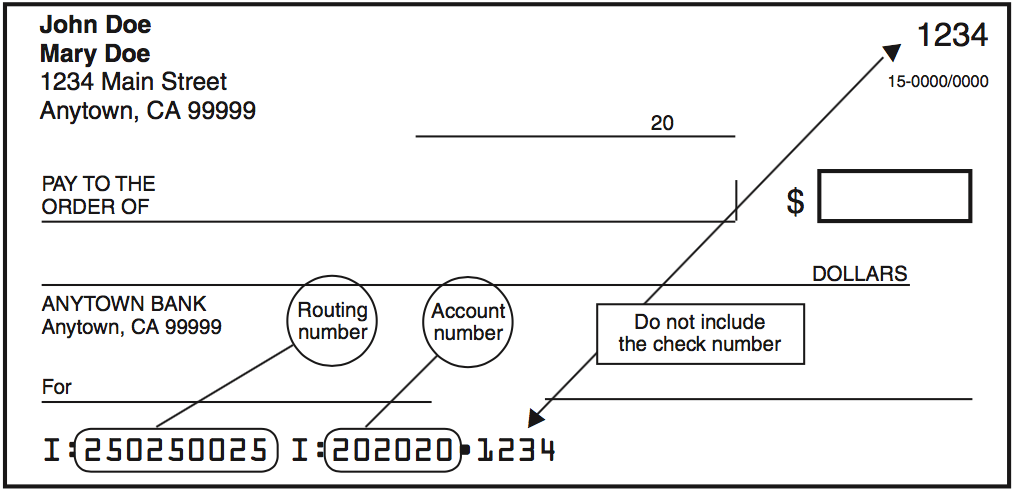
If you CalFile or e-file, instead of paying by check, you can use this convenient option. Simply provide your bank information, the amount you want to pay, and the date you want the amount to be withdrawn from your account. You can find the routing and account numbers on your check or by contacting your financial institution. Use the check illustration near the end of the Direct Deposit instructions to find your bank information. Your tax preparation software will offer this option.
Web Pay
Enjoy the convenience of online payment with the FTB. This secure service lets you pay the current amount you owe, extension payments, estimated tax payments, and prior year balances. For more information, go to ftb.ca.gov/pay.
Credit Card
Use your Discover, MasterCard, American Express, or Visa card to pay your personal income taxes (including tax return balance due, extension payments, estimated tax payments, and prior year balances). The FTB has partnered with ACI Payments, Inc. (formerly Official Payments) to offer you this service. ACI Payments, Inc. charges a convenience fee based on the amount of your payment.
Go to the ACI Payments, Inc. website at officialpayments.com and select Payment Center, or call 800.2PAY.TAX or 800-272-9829 and follow the recorded instructions. ACI Payments, Inc. provides customer assistance at 800-487-4567 Monday through Friday, 6 a.m. to 4 p.m. PST.
Payment Date:
Confirmation Number:
Check or Money Order
Using black or blue ink, make your check or money order payable to the “Franchise Tax Board.” Do not send cash or other items of value (such as stamps, lottery tickets, foreign currency, and gift cards). Write your SSN or ITIN and “2025 Form 540 2EZ” on the check or money order. Enclose, but do not staple your check or money order to the tax return.
Make all checks or money orders payable in U.S. dollars and drawn against a U.S. financial institution.
e-file: If you e-filed your tax return, mail your check or money order with form FTB 3582, Payment Voucher for Individual e-filed Returns. Do not mail a copy of your e-filed tax return.
A penalty may be imposed if your payment is returned by your bank for insufficient funds.
Request Monthly Installments
Pay as much as you can when you file your tax return. If you cannot pay your taxes in full, you can request approval to make monthly payments. However, you will be charged interest and penalties. You will need to complete form FTB 3567, Installment Agreement Request.
To submit your request electronically, go to ftb.ca.gov and search for installment agreement. To submit your request by mail, go to ftb.ca.gov/forms to download and print form FTB 3567 or call 800-338-0505, and follow the recorded instructions. Enter code 949 when instructed. Mail the completed form to the FTB at the address shown on the form.
Line 36 – Refund or No Amount Due
Did you report an amount on line 34?
- No
- Enter the amount from line 32 on line 36. This is your refund amount. If it is less than $1, attach a written statement to your Form 540 2EZ requesting the refund.
- Yes
- If the amount on line 34 is:
- Less than the amount on line 32, subtract line 34 from line 32 and enter the difference on line 36. This is your refund amount.
- More than the amount on line 32, enter zero on line 36.
Direct Deposit
Direct deposit is fast, safe, and convenient. To have your refund directly deposited into your bank account, fill in the account information on Form 540 2EZ, Side 4, line 37 and line 38. Fill in the routing and account numbers and indicate the account type. Verify routing and account numbers with your financial institution. Do not attach a voided check or deposit slip. See the illustration near the end of the Direct Deposit instructions.
Individual taxpayers may request that their refund be electronically deposited into more than one checking or savings account. This allows more options for managing your refund. For example, you can request part of your refund go to your checking account to use now and the rest to your savings account to save for later.
The routing number must be nine digits. The first two digits must be 01 through 12 or 21 through 32. On the sample check, the routing number is 250250025. The account number can be up to 17 characters and can include numbers and letters. Include hyphens, but omit spaces and special symbols. On the sample check, the account number is 202020.
Check the appropriate box for the type of account. Do not check more than one box for each line.
Enter the portion of your refund you want directly deposited into each account. When filing an original return, the total of line 37 and line 38 must equal the total amount of your refund on line 36. If line 37 and line 38 do not equal line 36, the FTB will issue a paper check.
When filing an amended return, only complete the amended Form 540 2EZ through line 36. Next, complete Schedule X. The amount from Schedule X, line 11 is your additional refund amount. This amount will be carried over to your amended Form 540 2EZ and will be entered on line 37 and line 38. The total of the amended Form 540 2EZ, line 37 and line 38 must equal the total amount of your refund on Schedule X, line 11. If the total of the amended Form 540 2EZ, line 37 and line 38 does not equal Schedule X, line 11, the FTB will issue a paper check.
Adjusted Refunds – If there is a change made to your refund, you will still receive your refund via direct deposit. For more information on direct deposit of adjusted refunds, go to ftb.ca.gov and search for direct deposit.
Caution: Check with your financial institution to make sure your deposit will be accepted and to get the correct routing and account numbers. The FTB is not responsible for a lost refund due to incorrect account information entered by you or your representative.
Prior to depositing the refund, the FTB may first verify with your financial institution that the name on the account you designated to receive the direct deposit refund matches the name provided on the tax return.
Some financial institutions will not allow a joint refund to be deposited to an individual account. If the direct deposit is rejected, the FTB will issue a paper check.
Direct Deposit for CalABLE Account – If you have an eligible disability, you may contribute your refund to a tax-advantaged CalABLE account while protecting eligibility for public benefits. Please visit calable.ca.gov for instructions.
Direct Deposit for ScholarShare 529 College Savings Plans – If you have a ScholarShare 529 College Savings Plan account maintained by the ScholarShare Investment Board, you may have your refund directly deposited to your ScholarShare account. Please visit scholarshare529.com for instructions.
Voter Information
Voter Registration Information – To register to vote in California, you must be:
- A United States citizen and a resident of California,
- 18 years old or older on Election Day,
- Not currently in state or federal prison or on parole for the conviction of a felony, and
- Not currently found mentally incompetent to vote by a court.
For information on voter registration, check the box on Form 540 2EZ, Side 4, and go to the California Secretary of State website at sos.ca.gov/elections or see "Voting Is Everybody’s Business" section on the Additional Information section.
Health Care Coverage Information
If you are interested in no-cost or low-cost health care coverage information, check the “Yes” box on Form 540 2EZ, Side 4. If you check the “Yes” box, you, and your spouse/RDP, if filing a joint tax return, authorize the FTB to share limited information from your tax return with Covered California (the state agency that provides Californians with access to affordable health insurance) for their outreach and enrollment efforts. Limited information that will be shared include the following:
- Taxpayer name, or in the case of taxpayers filing a joint tax return, the names of both spouses or registered domestic partners.
- Full mailing address listed on the tax return.
- Number and age of household dependents.
- Gross income.
Organ Donor Election Consent Information
By checking the applicable box and signing the tax return, you are registering as an organ and tissue donor and agree to the recovery of organs and tissues after your death. Registering as a donor will not affect your medical treatment in any way. Unless the donor is under 18 years of age, your decision does not need approval from anyone. If you are under 18 years old, you can register, and your parents or legal guardian will make the final donation decision. You agree that the Franchise Tax Board can electronically send your full name, home or mailing address, date of birth, and last four digits of your social security number to Donate Life California.
Registering as an organ donor allows individuals to help others through the gift of organ, eye, and tissue donation. Anyone is a potential organ donor regardless of age or medical conditions. As an organ donor, your gift will be used to help others through transplantation, therapy, research and/or education. The Donate Life California Registry is a confidential database.
The individual's written consent to have their information shared with Donate Life California shall be valid for one year from the date the return is signed. It may take up to 30-45 days for individual information to appear on Donate Life California’s website registry.
The FTB does not have access to or maintain enrollment information. Contact Donate Life California at donateLIFEcalifornia.org or 866-797-2366 to get more information about donation and to:
- Add or remove your name from the registry
- Provide Donate Life California with your email address
- Limit your donation to specific organs or tissues (e.g., lungs, kidney, heart)
- Decide how your organ and tissue donation will be used (e.g., transplants or research)
Sign Your Tax Return
Sign your tax return on Side 5. If you file a joint tax return, your spouse/RDP must also sign it. If you file a joint tax return, both you and your spouse/RDP are generally responsible for tax and any interest or penalties due on the tax return. If one spouse/RDP does not pay the tax, the other spouse/RDP may have to. See “Innocent Joint Filer Relief” under Additional Information section for more information.
Include your preferred phone number and email address in case the FTB needs to contact you regarding your tax return. By providing this information, the FTB will be able to provide you better customer service.
Paid Preparer’s Information
If you pay a person to prepare your Form 540 2EZ, that person must sign and print the paid preparer's name, phone number, identification number, and complete the applicable paid preparer information on Side 5. The IRS requires a paid tax preparer to get and use a preparer tax identification number (PTIN). If the preparer has a federal employer identification number (FEIN), it should be entered only in the space provided. A paid preparer must give you a copy of your tax return to keep for your records.
Third Party Designee
If you want to allow your preparer, a friend, family member, or any other person you choose to discuss your 2025 tax return with the FTB, check the “Yes” box in the signature area of your tax return. Also, print the designee’s name and telephone number.
If you check the “Yes” box, you, and your spouse/RDP if filing a joint tax return, are authorizing the FTB to call the designee to answer any questions that may arise during the processing of your tax return. You are also authorizing the designee to:
- Give the FTB any information that is missing from your tax return.
- Call the FTB for information about the processing of your tax return or the status of your refund or payments.
- Receive copies of notices or transcripts related to your tax return, upon request.
- Respond to certain FTB notices about math errors, offsets, and return preparation.
You are not authorizing the designee to receive any refund check, bind you to anything (including any additional tax liability), or otherwise represent you before the FTB. If you want to expand or change the designee’s authorization, go to ftb.ca.gov/poa.
The authorization will automatically end no later than the due date (without regard to extensions) for filing your 2026 tax return. This is April 15, 2027, for most people. To revoke the authorization before it ends, notify us by telephone at 800-852-5711 or in writing at Franchise Tax Board, PO Box 942840, Sacramento CA 94240-0040. Include your name, SSN (or ITIN), and the designee’s name.
Assembling Your Tax Return
Assemble your tax return and mail it to the FTB.
To help with our processing costs, enclose, but do not staple, your payment. Attach your federal Form(s) W-2 to the lower front of your tax return. Include California supporting forms and schedules behind Side 5 of Form 540 2EZ.
Do not enclose a copy of your federal tax return or any other document with your Form 540 2EZ.
Caution: Form 540 2EZ has five sides. When filing Form 540 2EZ, you must send all five sides to the FTB and Side 5 must be signed.
Mailing Your Tax Return
Mail your tax return to the following address if your tax return shows an amount due:
- Franchise Tax Board
PO Box 942867
Sacramento, CA 94267-0001
Mail your tax return to the following address if your tax return shows a refund, or no amount due:
- Franchise Tax Board
PO Box 942840
Sacramento, CA 94240-0001